

Purpose
Enable resellers and white-label partners to grow an approved tenant portfolio without receiving unrestricted platform administration.
Real WebStore screen
What you see
Controlled demonstration data · no customer records
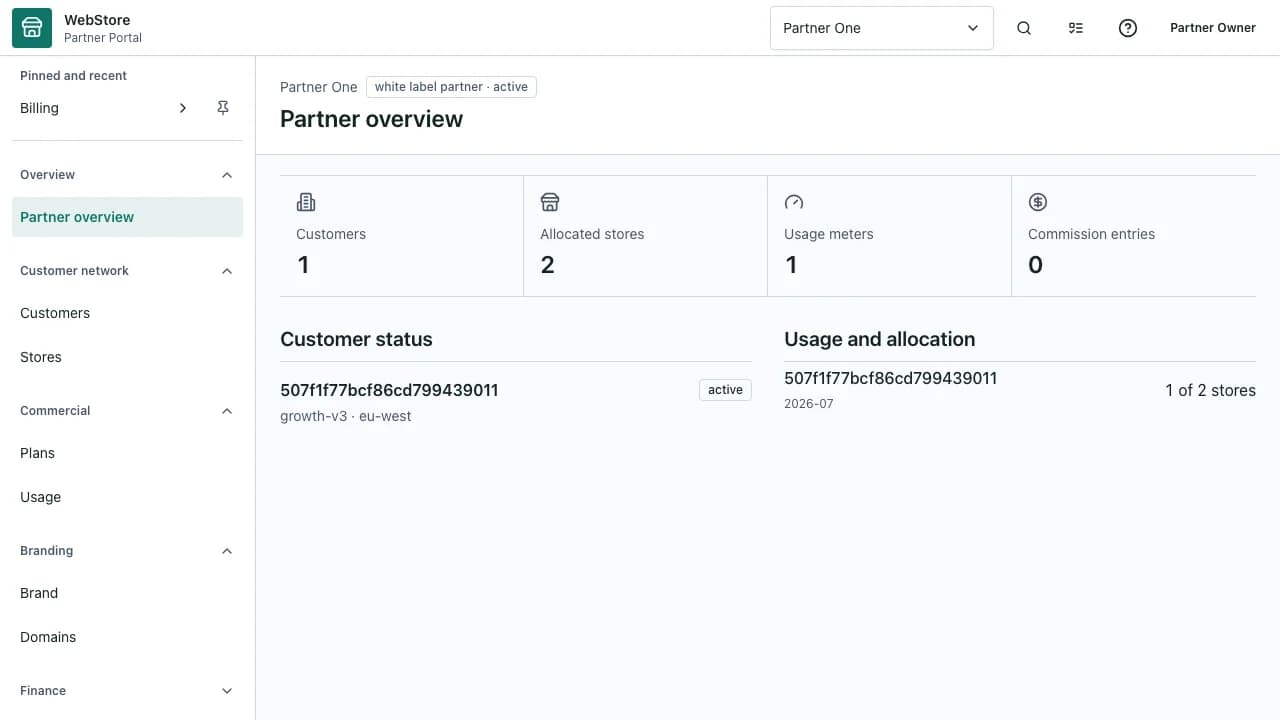
- 1Partner identity and navigation
- 2Assigned tenant portfolio
- 3Commercial and support boundaries
- View only tenants assigned to the partner contract.
- Apply permitted branding, domain and allocation controls.
- Escalate support and commercial changes through a traceable path.
Workflow
- 1
Claim or sign in to the approved partner account.
- 2
Select a tenant from the assigned portfolio.
- 3
Review contract capabilities and current allocations.
- 4
Complete the permitted branding, domain or tenant action.
- 5
Verify the tenant outcome and retained partner audit evidence.
Operate the assigned portfolio
Partner hierarchy and contract scope determine which tenants appear.
- Search by tenant name or identifier.
- Check lifecycle and data region before making a change.
- Do not use partner access for normal store operations.
Control brand and domain changes
White-label changes follow the capabilities and approval path in the partner contract.
- Preview brand assets before publication.
- Verify domain ownership and certificate state.
- Keep WebStore platform safety and legal requirements visible.
Respect commercial limits
Plans, allocations and commissions are versioned so tenant entitlement stays explainable.
- Review store and feature allocations before onboarding.
- Use approved pricing and contract versions.
- Escalate limit changes instead of bypassing policy.
Permissions and boundaries
- Partner capabilities are independent from admin and business roles.
- A partner sees only its own hierarchy and assigned tenants.
- Commercial, branding and support actions remain separately auditable.
When it goes wrong
If a tenant is missing, confirm assignment, hierarchy and contract status.
If a capability is disabled, review the active partner contract rather than tenant flags.
If a domain cannot activate, verify ownership, DNS and certificate checks.