

Purpose
Let an individual use WebStore personally or on behalf of a company without mixing addresses, permissions, listings and order history.
Real WebStore screen
What you see
Controlled demonstration data · no customer records
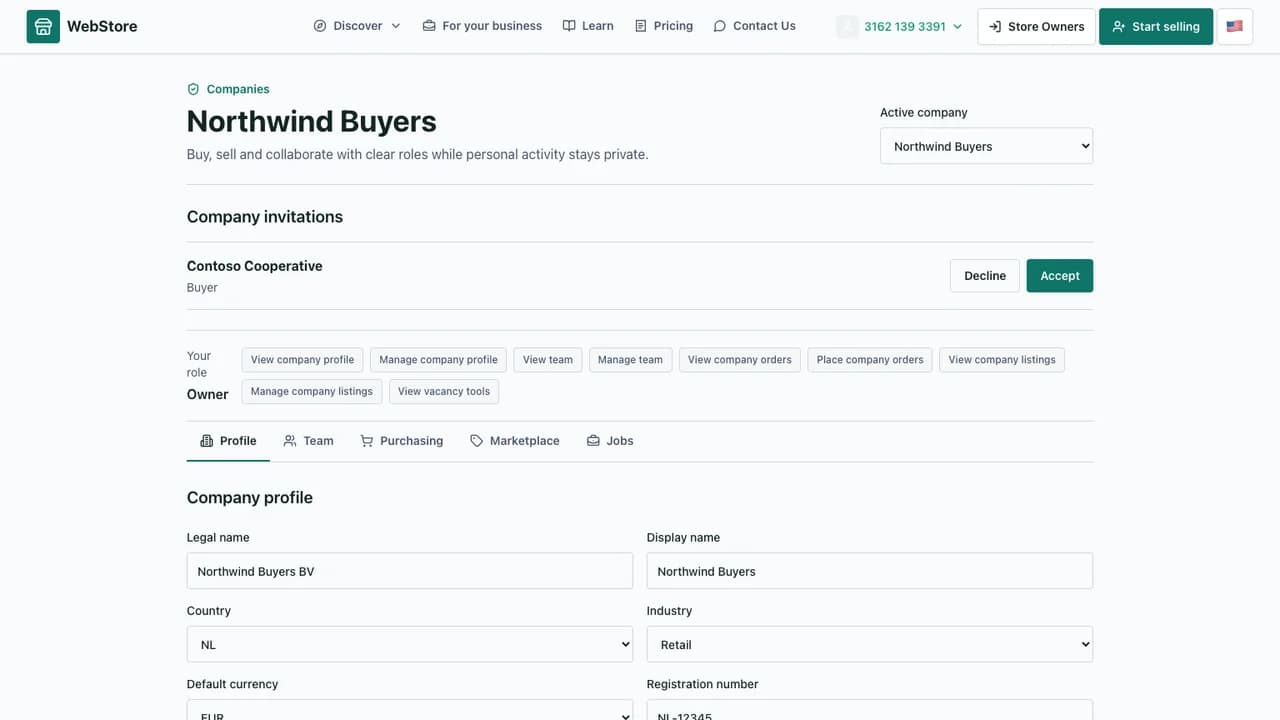
- 1Personal and company context
- 2Role-aware company views
- 3Addresses, team and business activity
- Track personal orders and customer conversations.
- Create or join a company with explicit roles.
- Separate business purchasing, second-hand listings and recruitment activity.
Workflow
- 1
Sign in to the consumer account and confirm personal identity.
- 2
Create, select or accept an invitation to a company context.
- 3
Use the role-visible profile, team, purchasing, marketplace or jobs view.
- 4
Choose the company at checkout or when publishing a business listing.
- 5
Return to personal context for individual activity.
Use the personal account
The personal context owns individual orders, messages, addresses, applications and second-hand activity.
- Keep contact and saved addresses current.
- Review order and application status from their dedicated views.
- Use privacy controls for exports, communication and account security.
Work for a company
A company is a separate context with legal details, business addresses and member roles.
- Owners manage membership and permissions.
- Buyers place and review company orders.
- Marketplace sellers and recruiters see only their assigned tools.
Prevent context mistakes
The selected personal or company context determines ownership of the next action.
- Confirm the company before checkout or publication.
- Do not reuse a personal address as billing data without review.
- Keep each employee on a separate user account.
Permissions and boundaries
- Company roles control profile, members, purchasing, marketplace and jobs independently.
- A company member cannot see another company unless separately invited.
- Personal history remains attached to the consumer rather than the employer.
When it goes wrong
If a company tab is missing, check membership status and role permissions.
If an order used the wrong owner, verify the selected context before placing a replacement.
If an invitation is absent, confirm the recipient account and invitation status.